Edge Free Fixed Frame Projector Screen
Downloads
User Guides
- User's Manual (PDF)
- N-type User's Manual (PDF)
- Z-type User's Manual (PDF)
- M-type User's Manual (PDF)
- EN-type User's Manual (PDF)
Dimensions Tables
Others
Shipping & Returns
Shipping & Returns
📝 Our Shipping & Return Policy
- Purchase Orders for GROUND shipping service received by 5:00 PM (PST) are processed to be shipped from Elite’s warehouse within 2-5 business days. You will receive an email confirmation when your order has shipped.
- All orders are fulfilled Monday through Friday, excluding weekends and holidays. We are not responsible for unexpected shipping delays caused by circumstances related to the courier, weather or state of emergency.
- Oversize Shipping : If your order is shipped via Pilot Freight Services, they will contact you to schedule a delivery.
SKU:AK-NB100H1
Couldn't load pickup availability
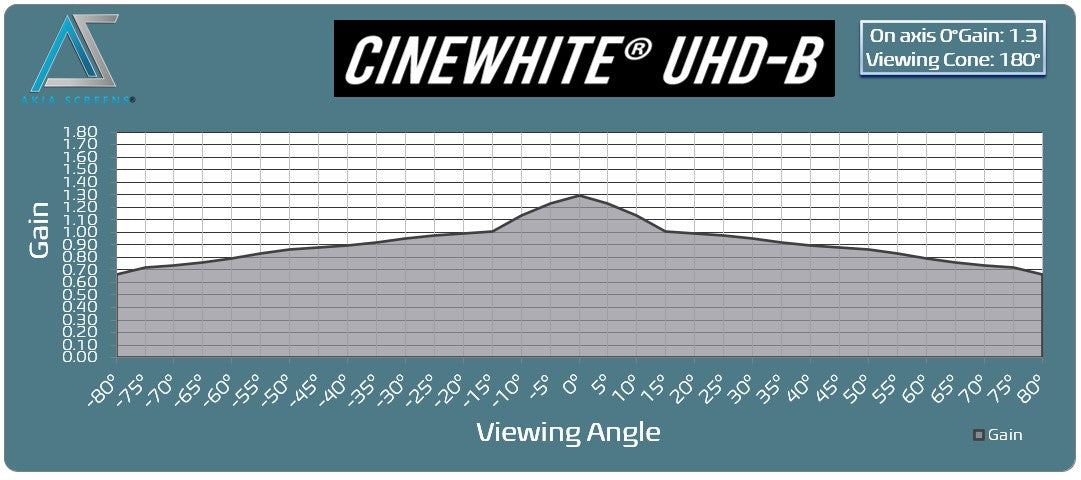
I ordered a 135” Elite Screen for myself and a 125” Akia Screen for a friend. The Elite Screen never showed up supposedly damaged in transit and by the time they cancelled my order they ran out of stock. The Akia 125” screen was one day late and my friend decided to go another route. The Akia screen was very well packaged and no damage to the box so I decided to use it for myself. even though I wanted the larger screen.Packaging, build/material quality and instructions are excellent. If installed correctly everything fits perfectly. The screen type I received was type Z which I think stands for velvet frame with springs. Installation was very easy and springs were easy to install with the provided tool.I really wanted to install an LED light kit which the manufacturer told me was possible but, the instructions clearly state that they do not recommend the LED light kit due to the "nature of the square design”. Manufacturer replied again that it was possible to do this so I will call up their support line and find out how. The problem I see is that the frame is flat against the wall so there is no gap for the light to reflect outside the frame. I will update this review when I get this working.The Cinewhite UHD-B screen material is fabulous. I have a light controlled home theater room and am replacing an old Elite Screen with a Powergain (1.8 gain) screen material which has served me very well over the past few years. The Cinewhite is more matte like with much more uniform colors/brightness from any angle.In summary I am very happy with this purchase and the product. Akia’s website is very organized and up to date with the latest products and user questions on Amazon are answered right away by the manufacturer which is greatly appreciated. I recommend Akia Screens both for their support and excellent product workmanship.BTW: For those interested the box indicated that the Akia Screen 125" Cinewhite UHD-B was made in Vietnam
I am very pleased with the final result of the 125-inch fixed frame series AKIA screen. I was able to fully assemble the screen alone. I originally was concerned that the screen material would not stretch over the frame, and was certain that I was sent the wrong size screen. I contacted customer support by phone and was given encouragement that convinced me to continue. I reviewed several videos on assembly of these type of screens that use springs and slowly but surely was able to complete the process.My setup may be different than most. I basically did a ceiling mount (Actually floated from L brackets), so the frame is about 8 inches from my wall. This was needed as I had 2 windows behind my wall that would limit the size of the screen. Previously I had a 82 inch custom build projection screen that fit between the 2 windows on the wall. I always wanted to go much bigger on the screen but originally felt that would not be possible. Here is what I finally did:I added 6 L-brackets to the top of my wall. Four of the brackets would be to support the screen using the supplied Wall Brackets. (The directions tell you to use 2 of the brackets for the top and 2 of the brackets for the bottom. I changed this and placed all 4 of the wall brackets on the top.I purchased a large curtain rod from Amazon that was adjustable from 120 to 170 inches. This Rod was simply supported on the top of the 6 L-Brackets. I also purchased 8 Theater Grade Extreme 100% Blackout Grommet Curtain Panels, 52” x 95”. 6 of the panels were black and for the ends, I used 2 red panels. This took care of blacking out the background from the 2 windows, and I was now able to have full light control in the room.I was able to make 4 custom metal bracket adapters that I painted flat black, which allowed me to mount the screen to the L-Bracket and wall mounting brackets to float the screen. Wire or other mounting options would have worked here as well.The screen had a tendency to angle in toward the wall slightly. For this reason, I placed 2 additional L-Brackets at the bottom of the screen hitting the Frame so that the screen was now perfectly vertical. The curtain panels completely hide all brackets and the screen has a nice floating look.I am considering adding 2 4x4 blocks cut to size from floor to the bottom of the screen to relieve any pressure on the bottom of the screen. In all honesty, I am not sure this is even needed as the frame this screen is supported on is very heavy duty, and I doubt any sagging would occur over time.Overall, I am very happy with how this has turned out and I believe the screen is of exceptional quality and a very good product. The only issues I had are as follows:Tension Rods: Horizontal rods, were fine with proper overlap. The 2 Vertical rods were too short. The rod length just matched the length of the outside holes of the fabric. This result on one of the sides tearing through the mounting hole. I ended up having to purchase 2 brass rods of the same diameter to get some overlap for the springs to attach to the frame.While nowhere in the manual is this mentioned, I found it much easier to mount the screens with the spring oriented in a certain direction. One end of the spring seems to make a perfect half circle (Better for tension rod), and the other end, is less angled, and that end seems to more easily mount to the metal frame. Also, I found that in many cases it was easier to first start the spring by attaching it to the frame, and then pull it over through the tension rod hole.The supplied Allen wrench was not of the greatest quality. It was starting to strip as I was tightening the screws. I switched to a much higher quality Allen wrench I had, which greatly improved my ability to tighten down all screws without slippage or striping.Overall, I am very pleased with the result. It is a bit of work, and my fingers are still a bit numb from stretching the springs into position, but the supplied tool does get the job done.
I recently got a VAVA 4K ultra-short throw projector and was in the market for a projector screen. This was my first experience in the projector screen market so rather than going with an expensive ALR screen, I decided to go for the more budget friendly 100” edge free fixed frame cinewhite screen with Axia. The quality of this projector screen for the price I paid is amazing; it's very clear and better than I expected! It feels like in a movie theater and the modern design gives a nice look to the room. You can watch during any time of the day and the screen will still give the good colors and the image you want. And in a darkened environment, the screen performs superbly.The assembly manual could definitely use some updating as I found it challenging to follow, but being the relatively handy person that I am, I was able to assemble the screen by myself (hanging the frame is definitely a two person job though).Overall, I am quite thrilled with my purchase and would highly recommend Axia screens for those in the market for a projector screen. P.S. my furry little four legged kiddo loves watching the fish screensaver!
I replaced a motorized 120" screen with this 145" monster from Akia Screens and I regret nothing! I almost went with the 125" screen from Akia, but after measuring the different image sizes and projecting them onto my wall, it was clear that bigger is MUCH better! This screen is over 10 feet wide and almost 6 feet tall! The packaging could have been sturdier, but there was no damage to the box contents, and assembly went quicker than I expected. You'll need an extra set of hands to hang the screen on your wall, but the screen weighs less than 40 pounds so it's very manageable. The instructions said the lighting kit would not fit, but I added LED lighting around the perimeter by screwing 90 degree drywall corner protectors onto the back of the screen and offsetting the hangers to allow extra space in the back of the screen. I used 32.8 feet of Govee RGBIC LED strips which fit perfectly without cutting, and I think it really looks fantastic! This CINEWHITE screen is ideal for my light-controlled basement but if you can't control the light in your room then you may need one of the Ambient Light Rejecting screens to prevent washout (hence the 4-star rating). My BENQ W1070 projector is only 1080P and 2000 lumens, but the picture on the screen is sharp and bright, and 3D movies look almost as good as in the theater. Overall I could not be happier with my purchase!
Pros:Image quality. Wow. Nothing even close to projecting against the wall. Colors are brighter and allow for a nice, colorful and clear image.Very thin "bezels" which provides with a great looking quality screen.Came with extra screws and tools to get the screen set.Cons:Installation. While it is not that difficult, there are certain steps that are just shown on the video and on the instructions but require to pay attention to make sure it allows for a smooth surface on the screen side.Some screws were really low quality (specifically, the one to hang the screen to the wall). I skipped them and used some of mine.Other thoughts:Here are a few tips to installing this screen:1) Make sure you have plenty of space and 2 people available to put it together. I did it by myself and it felt harder than it should have been.2) Check you have all the parts. They give you extra screws, but sometimes, things do not fully match properly, so make sure you have everything beforehand.3) when putting it together, make sure you center the material for the screen on the frame. Otherwise, you may run into small folding issues on the corners. Since you may have the screen side looking down, you may not see it until you are doing setting it up, and then finding out the imperfections. Here is where the "2 people" can help. As long as both people are doing the opposites springs, you will be fine.4) Skip the mounting screws. Horrible and were stripped very quickly. I used my own.Once I was done with the installation, I loved it. Get it.
Share